Ask only before a step you cannot undo
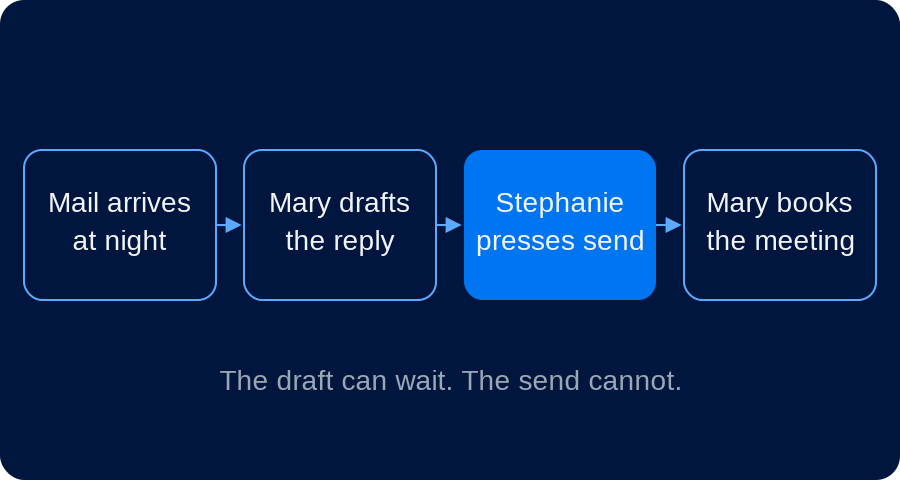
Mary drafts the reply while Stephanie sleeps. It asks only before a step you cannot undo: sending the mail, or booking the meeting.

Tuesday, 3:10. Stephanie is asleep. In Singapore the morning has started, and a prospect has written to her: a meeting as soon as possible, the request for quote attached.
Mary already does other chores for the office, and it has her inbox. It reads the mail and the request. When she wakes, the reply is in the thread, in her words, with the documents that answer it. Nothing has been sent, and the meeting is not on the calendar.
That is what you want from a colleague at three in the morning. It is also where the doubt starts. What if it gets the quote wrong, and the mail goes out while she sleeps?
What if it gets something wrong?
It will, sometimes. A date misread, the previous version of a price list, a tone that is a shade too brisk. The fear is fair. An answer that leaves the office at 3:10 is not a draft you can quietly fix at breakfast.
The first answer everyone reaches for is the right one: ask me first. Asked on every step, it is also how a colleague becomes a queue. If Mary has to ask before it opens the attachment, before it looks up a document, before it writes a line, Stephanie spends the morning tapping yes on work she hoped to find done.
Ask before the step you cannot take back. Let the rest run.
What can it do while she sleeps?
Read. The mail, the earlier messages if there are any, the request for quote. Find the documents that match it, the price list and the terms, and check Stephanie’s calendar for a time that is actually free.
Then write. A draft reply in her tone, short, in the sender’s language, the free time named in the text, those documents attached. Save it in the same thread, where she would have started typing.
None of that leaves the office as a promise. A draft can be edited. A draft can be deleted. A wrong attachment is a wrong attachment until someone presses send. Checking the calendar changes nothing on it: reading a free slot is not the same as inviting people to it.
Two things wait. Sending the reply. Booking the meeting. The second is the one that gets forgotten. Once the event exists, the people on it are invited, and an invite is as hard to take back as the mail. Both can wait until morning. The customer is not left with silence: the draft is ready the moment Stephanie opens the thread.
Where do you draw the line?
In the chore, in the same plain words you already use to brief Mary. Here is Stephanie’s inbox:
When a mail arrives in Stephanie’s inbox, read it and any request attached to it. If it is a newsletter, a receipt or an automated notice, stop.
Otherwise write a draft reply in her tone: short, in the sender’s language, signed with her first name. Check her calendar and propose a time you actually find free. Attach the documents that answer the request, from the price list and the terms folder. If a fact is not there, leave that line for her and do not guess. Save the draft in the thread. Do not send it, and do not book the meeting.
When Stephanie sends that draft, create the event on her calendar at the time the draft proposed: the people on the thread, an agenda taken from the request, and a conference link. If the calendar has no free slot, say so in the draft and do not invent one.
Every line is yours to change. A customer who must be read before a draft even exists gets a sentence. A mailbox that should never book on its own loses the last paragraph.
The same line sits on the tool, and that part is a minute of setup. This chore is given the draft tool and not the send tool. Mary can create a draft in the thread. It cannot send one, because sending is not available to it. A sentence in the chore can be skipped on a busy night. A tool that is not there cannot send.
What does she find in the morning?
The thread, open on the draft. The time came from her own calendar. The documents are the ones the request needed. She reads it the way she would read a draft from a careful colleague: one line to change, or none. Then she presses send.
That press is the permission. Mary does not ask a second time. The mail going out is Stephanie saying the answer is hers, including the time it proposed. Mary takes that and creates the event: agenda, participants, conference link.
If the draft is wrong, she deletes it and writes her own. Nothing went out, and nothing was booked. That is the worst case, and it is the morning she would have had anyway, plus a draft she threw away.
Why not ask about every step?
Because the night is the point. About 43% of professionals spend three hours a week or more just scheduling meetings, and the mail that starts one often lands when the person who should answer it is asleep. The reading, the documents, the draft: that work can happen then. The send, and the booking that follows it, should not.
An approval on every read is a slower inbox with extra taps. An approval on the send is the button Stephanie already uses. You move the line by editing the chore, not by watching every step the box takes.
Where to start
- One inbox. Stephanie’s, or the shared address that gets the requests which cannot wait until morning. Mary already has chores. This is the next one.
- Drafts on, sending off. Give the chore the draft tool and leave send off. Look at that screen once. That is the setup.
- Book after the send. Add the line: when she sends the draft, create the event at the time it proposed. For a week, read every draft before it goes. If you change the same line twice, put that change in the chore.
Mary does the work you can undo while the office is closed, and it waits where you cannot. The briefing is the same kind you already know how to write: your first chore.
Meet your Aivell before everyone else.