Hello world! What is an Aivell?
What an Aivell does all day, where it lives, who stays in charge and what it costs.

Monday, 8:40. There are forty new emails in the company shared inbox. Three of them matter: a supplier invoice that doesn’t match its order, a client asking to move Thursday’s appointment, and a certificate you have been chasing for two weeks. The other thirty-seven still have to be opened to find that out.
Nobody in the office was tasked to do that sorting. Everybody does it anyway. Until Mary Aivell joins the team. The average office worker gets about 121 emails a day, and sorting them is the part of the job no job description mentions.
What is this blog?
Short posts for the people who run an office: the owner, the office manager, the person everyone asks “where’s that file?”. Plain words, and nothing we can’t back up.
Posts are grouped in trails: small series you read in order, each one building on the last. This post opens the first trail, Introduction. Next comes How it works: how you write a chore in plain words, how your Aivell drafts email replies for you to check, why a chore stays readable months later, how you approve a step from your phone, and why the fee doesn’t change with the amount of work.
Any post reads fine on its own. Read them in order and by the end you’ll know whether an Aivell belongs in your office, and which job you’d give it first.
So what is an Aivell?
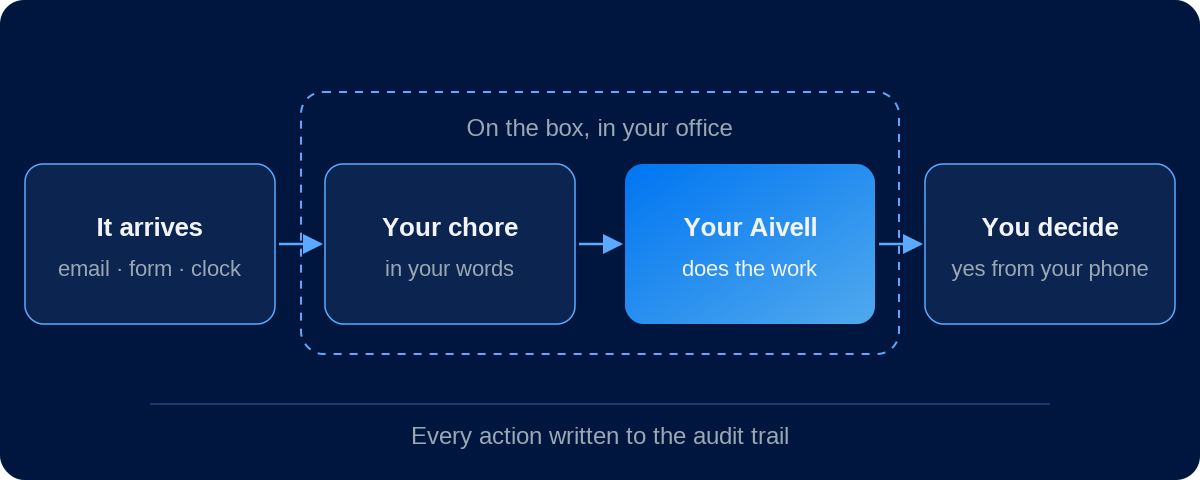
Mary is an AI colleague, with its own company email address. It lives on a small box in your office, and it does the chores you describe to it in plain language: sort the inbox, register supplier invoices, book appointments, chase missing documents, send the Monday report and much more.
The first name is one you choose; the surname is Aivell. You write to it the way you write to anyone else on the team. It isn’t a chat window you open when you remember to. It’s a colleague who is already at work when the email comes in.
The work it does comes in chores: one job each, written down by you in plain language. “Register supplier invoices.” “Book the appointments that come in by email.” “Send the Monday report to the partners.” Each chore is a short text in your words, with your rules, your exceptions and your colleagues’ names in it. English, Spanish, French or Italian today.
Is it an AI agent? Yes: software that reads, decides and acts on your tools instead of just chatting. But “agent” says little about how it behaves, and “colleague” says more. It follows the procedures you give it, it asks when it isn’t sure, and it tells you what it did.
What does it do all day?
A chore starts when something happens:
- An email arrives in an inbox it watches: info@, invoices@, bookings@.
- A form or another system sends it a message.
- A visitor writes in the chat on your website.
- The clock says so: every morning at 7, every Friday afternoon, the last day of the month.
Then it does the work with the tools you connected: email, calendar, spreadsheets, your database, documents and scans, network folders, a knowledge base built from your own documents, and a Browser Agent for web portals that offer no other way in.
What that looks like in a normal week:
- It sorts the company shared inbox, sends each email to the right person and answers the routine ones.
- It reads supplier invoices, PDF or photo, and copies the figures into your accounting sheet, flagging what doesn’t add up.
- It proposes appointment slots from the calendar, books them and sends the invites.
- It chases clients for missing documents until they arrive, and stops when they do.
- It builds the weekly report from your database and mails it to the team.
- It downloads the monthly invoices from supplier portals and files them in the right folder.
None of these is a demo. Each one is a job an office already does by hand, written down so someone else can do it.
A chore, as you’d write it
Like a note you’d leave a new colleague on their first day. This one is complete:
Every invoice that arrives at invoices@: read it, find the matching order in the orders sheet and register the invoice in the ledger sheet.
If the total differs from the order by more than €50, don’t register it. Send it to Marta and tell her which lines don’t match.
Invoices from a supplier we have never used go to Marco first, whatever the amount.
Keep the notes in the sheet in English, even when the invoice is in German.
No diagram, no code, no special syntax. When you write it, your Aivell works through it with you: it asks about the case you didn’t mention (“and if there’s no order at all?”), confirms which tools it will use, and proposes limits on each one. Then it runs in the background, every time an invoice arrives.
Six months later you can still read it. Changing it means editing a sentence: “also copy Anna on anything from the head office”. That’s the idea behind plain-language automation.
Where does it live?
On a box about the size of a hardback book: 20 by 20 by 5 cm, 1.5 kg, 65 W. It sits on a shelf, plugs into power and your network, and keeps working when the office is closed. Your partner installs it and sets up the first chores with you.
Cloud AI agents are billed for every word they read and write, so the harder they work, the more the month costs. An Aivell does its thinking on the box. It can work all day and the fee stays where it was.
The models run on the box. Your invoices, contracts and CVs are read by a machine two rooms away from the people they concern, not by a server you’ve never seen. Data on the box is encrypted at rest. Data leaves when a chore sends it, for example an email reply or a form filled on a portal, and the box contacts us for updates, the license and error reports, without your chore data.
Pull the network cable and the chores on local systems carry on: network folders, your database, the knowledge base. Steps that need the outside world wait for the connection to come back.
If your data can travel, there is also a cloud version on our servers in Europe: same chores, no hardware, but the data leaves your network. You can move from one to the other without rewriting a chore.
Who stays in charge?
You do. That’s the point of a colleague you can watch at work.
- Guardrails on every tool. You set what each tool may do: it can add rows to the sheet, editing existing ones is blocked. The limit sits on the tool, not in the AI’s judgement.
- Approvals from your phone. For the steps you pick, your Aivell prepares the work and waits. A notification arrives: “Invoice €1,240 doesn’t match the order. Register it?” You tap yes or no, wherever you are.
- An audit trail. Every action a chore takes is written down: what it read, what it did, who approved it.
- A stop button. One click freezes everything, one chore, or a folder of chores. Nothing is lost: the work waits where it stopped until you press Reactivate.
You choose how close to stay: be told about every action, approve only certain steps, or let a chore run on its own once you trust it. Cases a chore doesn’t cover normally go to a person.
It’s fair to say what it isn’t, too. The AI can still fail at a step or get one wrong: that’s why the guardrails, the approvals and the trail exist. It doesn’t decide what your business does. It does what you wrote, and asks about the rest.
What does it cost?
A one-time setup fee, then a fixed monthly fee. No bill per word read, no surcharge because it was a busy month.
On the box, setup is €1,500 and covers the hardware, its preparation and shipping. The monthly fee is €149 on Start (3 chores), €249 on Pro (15 chores) and €499 on Unlimited (no fixed number). The cloud version starts at €49 a month. Prices exclude VAT, and the quantities in each tier are indicative maxima. You can change tier at any time without changing hardware or rewriting chores.
A higher tier doesn’t make your Aivell smarter: every tier uses the same tools. It gives it more room to work, more chores and more runs a month.
Where to start
- Pick the chore that hurts. The one you’d hand a new hire on day one: the inbox, the invoices, the appointment requests. One is enough.
- Write it down the way you’d brief that new hire, with the one or two rules that matter: the threshold, the exception, the colleague to ask. If it fits in ten lines, it’s a good first chore.
- Follow the How it works trail. Five short posts on what happens to that text once your Aivell has it.
The next posts take one piece at a time, starting with how you write a chore. If you’d rather see the approvals first, read how an Aivell prepares the work and waits for your yes.
Meet your Aivell before everyone else.